
Nespresso Smart
NespressoFood & Drink
3.251.00 Reviews
- Version
- 1.3.0
- Installs
- 100.00K
- Age Rating
- Everyone
Screenshots
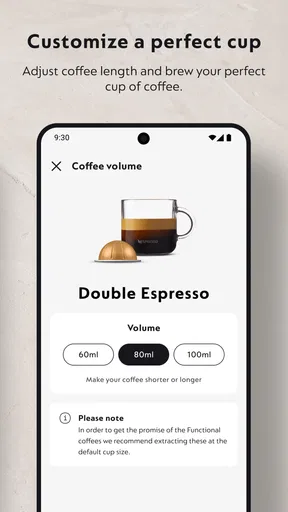
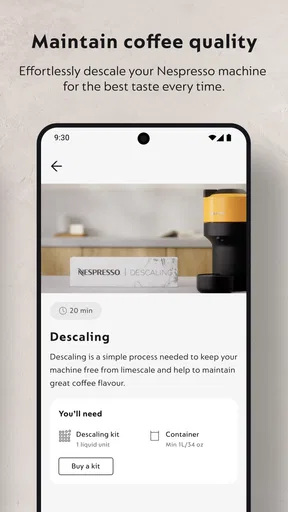
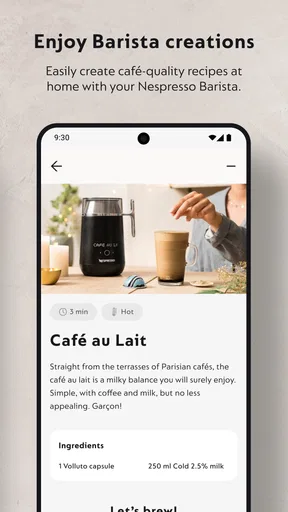
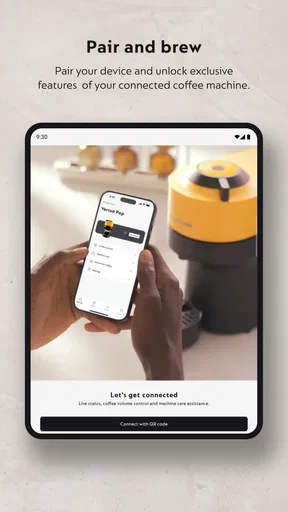
Our Review of Nespresso Smart
 Analysis by Appyee
I approached Nespresso Smart as a companion for a connected Vertuo coffee machine rather than as a general coffee app. That distinction matters. Its purpose is to bring machine management onto a phone, so the quality of the experience depends not only on the coffee itself but also on the conversation between the app, the machine, the phone, and the network. In my use, the most useful way to judge it is to ask whether that extra layer makes a normal coffee routine easier or simply adds another screen to something that already works well.
The app is free, made by Nespresso, and sits in the Food & Drink category. It is aimed at everyone, and the current release is version 1.3.0 for devices running Android 8.0 or later. Since its release on September 23, 2024, it has reached over 100 thousand installs. Its average sits at 3.2 from roughly 934 ratings, which tells me that expectations should be realistic: this is a useful tool for the right Vertuo owner, but not an essential download for every coffee drinker.
What connected coffee feels like in everyday use
I find connected coffee works best when I decide what I want the phone to handle before I start brewing, rather than reaching for the app out of habit. That small choice helps keep the machine’s physical controls available as a straightforward fallback and makes it easier to notice where the app genuinely saves effort. Next, I look at how that intention carries through the steps of a normal kitchen routine.
The app is most valuable when the machine is part of a routine
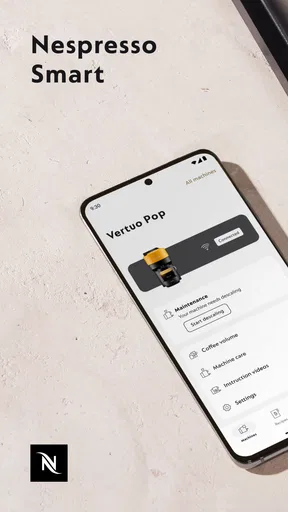
The clearest benefit appears when I treat the phone as a control and information point for the connected machine, not as a replacement for the machine's physical controls. A morning coffee routine is usually quick: choose a capsule, place it in the brewer, and start. Nespresso Smart becomes more worthwhile when I want to manage that routine with greater awareness, check the machine's connected state, or keep the coffee setup organized from the same place.
That makes it a better fit for someone who has deliberately bought a connected Vertuo model than for somebody with a standard brewer. The app does not transform an ordinary coffee maker into a smart appliance. Its value begins with compatible hardware, and the experience can feel unnecessarily elaborate if all I want is to press a button and walk away.
I also found that the app's role changes depending on where I use it. In the kitchen, close to the machine, it feels like a practical companion. In another room, it becomes more dependent on whether the phone can communicate properly with the connected setup. That is an important trade-off: convenience comes from connectivity, but connectivity also introduces another point where the routine can stall.
Network-dependent moments deserve attention
The phrase “smart coffee machine” can create the impression that every action will be immediate. I would not approach Nespresso Smart with that assumption. A connected experience can involve several handoffs: the phone needs to be ready, the application needs to reach the relevant service, and the machine needs to be available to respond. When those pieces line up, the process feels modern and tidy. When one does not, a simple coffee task can become a troubleshooting task.
This is why I recommend opening the app while standing near the Vertuo machine during initial setup or any important change. It is easier to notice whether the machine is responding, whether the phone is connected to the expected network, and whether the issue is with the app or the hardware. Trying to diagnose everything from another room wastes time because distance and network conditions can make the symptoms less clear.
A useful habit is to avoid making the app the only way you understand the machine. I keep the physical coffee routine familiar as well. If the application is slow or temporarily unavailable, I am less likely to mistake a connectivity problem for a machine fault. This is one of the less obvious lessons of connected appliances: the best setup is not the one that hides every technical detail, but the one that leaves you with a simple fallback routine.
How it fits into a mobile day
Nespresso Smart makes the most sense for people who already keep their phone nearby in the kitchen. For example, I can imagine using it while preparing breakfast, checking a work calendar, or moving between rooms before guests arrive. The phone becomes a convenient place to manage the connected Vertuo experience without needing to stand over the brewer for every interaction.
It is less compelling when the phone is usually elsewhere, locked away, or being used by several people. A shared kitchen can expose a practical weakness in app-based control: the person who needs coffee may not be the person whose phone is connected. In that situation, the physical machine remains the more inclusive interface. A household should decide whether the app is a personal convenience or part of a shared routine before relying on it.
I would also be cautious about using it as a remote-control fantasy. The useful mobile context is usually “I am near the machine and want better management,” not “I am far away and expect the complete coffee process to happen without checking anything.” Coffee preparation involves a real appliance, capsules, water, and a cup. A phone can improve oversight, but it cannot remove those physical steps.
Small workflow choices make a difference
One practical approach is to open the app before handling the capsule rather than after everything is ready. That gives the connection time to settle while I am still preparing the cup. It also makes it easier to spot a problem before starting a rushed morning brew. This may sound minor, but connected appliances are most pleasant when their digital steps are absorbed into an existing routine instead of added after it.
Another useful approach is to keep the phone close during setup, updates, or changes to the machine connection. Interrupting a connection process by leaving the room or switching networks can create confusion about what has actually completed. I prefer to finish one connected task fully, then return to normal coffee preparation, instead of tapping through several screens while multitasking.
The app is also better suited to deliberate management than constant browsing. I would not install it expecting an entertainment experience or a large coffee discovery platform. Its strength is practical: it helps connect a compatible Vertuo machine to a mobile workflow. That narrow purpose is a benefit if it matches your needs, but it is a limitation if you want a broad drink-planning or shopping companion.
When connection fails, recovery should be simple
The most frustrating moment with any appliance companion is not a dramatic failure; it is uncertainty. The machine may appear ready, the phone may appear connected, and yet the app may not show the state I expect. In that situation, I start with the basics: move close to the machine, check the phone's network connection, reopen the application, and give the connection a moment to refresh. These steps are ordinary, but they prevent me from changing several things at once and losing track of the original problem.
If that does not help, I separate the problem into two questions. Does the Vertuo machine operate normally by itself? Does the app recognize or manage the connected setup? If the physical coffee process works, the problem is more likely in the mobile connection or account-side communication than in the brewing hardware. If the machine itself is not responding, repeatedly tapping in the app is unlikely to solve it.
I also avoid treating a delayed screen as proof that an action failed. With connected devices, a slow update can look like a rejected command. Waiting briefly and checking the machine's actual state is safer than repeating the same command several times. This matters around any action that could affect the machine's status, because impatience can turn one uncertain request into several.
For a household, recovery is easier when everyone knows the fallback. If another person is waiting for coffee, use the machine's normal physical controls when appropriate rather than making them wait for a phone connection. The app should reduce friction, not become a gatekeeper for a basic drink. That is the standard I use when deciding whether a smart-appliance feature is genuinely useful.
Privacy and data-conscious habits
Because the app connects a phone to a household appliance, I recommend thinking about it like an appliance companion, not merely a recipe viewer. I pay attention to which phone is used for setup, keep the application limited to the people who need it, and avoid leaving a shared device signed in if the kitchen is used by guests or several family members. These are sensible habits whenever an app is tied to a physical device.
I also prefer using it on a stable, trusted home network rather than trying to configure the machine during travel or on a temporary connection. A coffee machine is not the kind of device I need to manage from every network, so keeping the setup simple reduces both connection confusion and unnecessary exposure. The more complicated the network environment, the harder it becomes to tell whether a failure comes from the app, the phone, or the connection.
Data-conscious use does not mean avoiding the app. It means being selective. I would install it for a compatible Vertuo machine, complete the setup carefully, and use the features that genuinely improve management. I would not keep changing phones, networks, or account settings without a reason. Stable arrangements are especially valuable here because the app's purpose is practical continuity, not constant experimentation.
How it compares with ordinary alternatives
The usual alternative is simple: use the Vertuo machine directly and treat the phone as irrelevant. That approach wins for speed, shared access, and resilience. Anyone in the kitchen can understand it, and a basic brew does not depend on an application being open. If your coffee habits are consistent and you rarely need connected management, the traditional approach may feel better every day.
Nespresso Smart has the advantage when you specifically want the connected Vertuo experience in a mobile form. It gives the machine a digital companion and can make management feel more organized. The trade-off is that the app adds a dependency that the physical controls do not have. A traditional coffee routine has fewer moving parts; the smart routine offers more visibility and convenience when everything is working.
It also differs from general Food & Drink apps. A recipe app, café finder, or nutrition tracker can be useful without owning a particular appliance. This one is much more hardware-specific. That specialization is exactly why it can be helpful to a connected Vertuo owner and irrelevant to somebody shopping for recipes or coffee ideas. I would choose based on the machine first, not on the category label.
Who should install it, and who should skip it
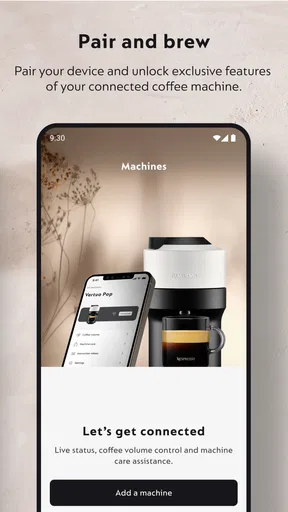
I think it is worth trying if you own a connected Vertuo machine, keep your phone close in the kitchen, and want the machine's management experience in one place. It is also a reasonable choice if you enjoy connected-home products and are comfortable spending a little time making sure the setup is stable. The free price makes that trial easier, especially when the app is being used alongside hardware already purchased.
I would skip it if you do not have a compatible connected Vertuo model, if several people need equal access without relying on one phone, or if you strongly prefer appliances with no digital layer. I would also avoid making it central to your routine if a delayed connection would cause real inconvenience. For those users, direct machine controls are likely to be more dependable and less distracting.
The age rating of Everyone makes it broadly approachable, but that does not remove the practical requirement of compatible equipment. The important question is not whether the app is easy for a particular age group; it is whether the household has the right Nespresso setup and wants mobile management. That is the dividing line between a useful companion and an unnecessary download.
My verdict after looking past the novelty
Nespresso Smart is a focused app with a clear job: connect a compatible Vertuo coffee machine to a phone-based management experience. I like it most when I use it near the machine, as part of a calm routine, with a straightforward fallback if the connection misbehaves. Its best quality is not that it makes coffee feel futuristic; it is that it can make a connected machine easier to understand and manage for the people who actually want that.
Its average rating of 3.2 from around 934 ratings reflects the kind of tension I would expect from a connected appliance app. The idea is convenient, but every extra connection point can introduce friction. Version 1.3.0 shows that the software is still a relatively young part of the experience, so I judge it as a useful companion rather than a flawless reason to buy into smart coffee.
My recommendation is conditional but positive: if you already have a connected Vertuo machine and want mobile control or management, Nespresso Smart is worth installing and learning. If you only want a fast cup with the fewest possible steps, the machine's ordinary controls are the better answer. Connectivity improves the experience when it stays in the background; when it becomes the main obstacle, the traditional coffee routine wins.
That balance is ultimately what makes the app easy to recommend to a friend. I would tell a connected Vertuo owner to try it, set it up close to the machine, keep a simple fallback routine, and judge it by whether it saves effort over a normal week. I would not recommend downloading it just because it is a Nespresso app. Its value is specific, practical, and tied closely to how much you want your coffee machine to participate in your mobile life.
Verdict
Strengths of Nespresso Smart
- Quickly reorder capsules from your phone.
- Find nearby boutiques and recycling points with ease.
- Machine troubleshooting guides are clear and practical.
- Personalized coffee recommendations help explore new blends.
- Useful reminders for descaling and routine maintenance.
Limitations of Nespresso Smart
- Some features require a compatible connected Nespresso machine.
- Bluetooth pairing can be unreliable on certain phones.
- The app may feel unnecessary for simple coffee preparation.
- Availability of capsules and services varies by country.
- Background permissions may affect battery life over time.
Other Releases by Nespresso
View All
Nespresso Store
Shopping4.8
Similar Picks in This Category
View All
Rappi: Food Delivery, Grocery
Rappi, Inc - Delivery3.5

McDonald’s: Cupons e Delivery
Arcos Dorados4.3

Swiggy: Food Instamart Dineout
Swiggy4.7

Blinkit: Groceries & more
Blinkit4.8

foodpanda: food & groceries
Foodpanda GmbH a subsidiary of Delivery Hero SE4.0

Zomato: Food Delivery & Dining
Zomato4.7
Frequently Asked Questions
What is Nespresso Smart, and what can I do with it?
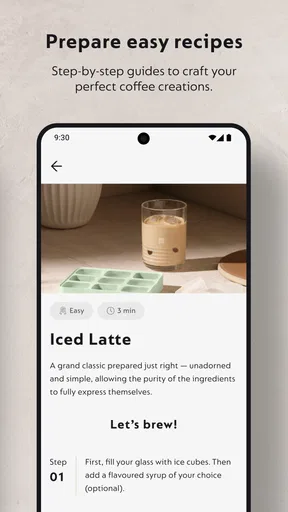
Nespresso Smart is a companion app designed to make managing compatible Nespresso coffee machines more convenient. Depending on the machine model and region, it can help you register your device, explore coffee varieties, access preparation guidance, manage maintenance reminders, troubleshoot common issues, and contact customer support. The exact features available may vary, so checking compatibility before downloading is important.
Which Nespresso machines are compatible with Nespresso Smart?
Compatibility depends on the specific Nespresso machine, its connectivity features, and the country where it was purchased. Not every Nespresso model can connect to the app, and some functions may only work with selected connected machines. Before installing, users should check the official compatibility information or search for their exact model in the app. Bluetooth, Wi-Fi, or location permissions may also be required.
Does Nespresso Smart require an account or an internet connection?
Some basic information may be viewable without signing in, but features such as machine registration, personalized support, purchase history, connected-machine management, and customer service generally require a Nespresso account. An internet connection is normally needed for account access, synchronization, updates, and online ordering. The app may also request Bluetooth, notification, or location permissions when connecting to a compatible machine.
Can Nespresso Smart help me clean, descale, or troubleshoot my machine?
Yes, one of the app’s useful purposes is helping users maintain a compatible Nespresso machine. It may provide cleaning or descaling instructions, maintenance reminders, guided preparation steps, and solutions for common problems. However, the guidance can differ between Original and Vertuo systems and between individual models. Always follow the instructions shown for your machine and consult official support if the issue continues.
Is Nespresso Smart free to download, and are there any additional costs?
Nespresso Smart is generally available as a free download, although availability can differ between the Apple App Store and Google Play depending on location. The app itself does not replace the cost of coffee capsules, accessories, delivery, or machine purchases. Some connected features may also depend on owning a compatible machine. Users should review the store listing, privacy details, and regional terms before installing.
